

Why Image-Heavy Marketing Emails Are Quietly Killing Your Deliverability (And What to Do Instead)
Most marketers are sending image-heavy emails without realizing they're tanking their inbox placement, alienating screen reader users, and losing sales. Here's what the data — and real practitioners — say about why text-first emails win.


Scroll through your inbox. You'll notice it almost immediately: a parade of glossy, full-bleed image emails from brands doing their best impression of a print catalog. Big visuals, tiny text, maybe a button floating somewhere in the middle. They look beautiful — in a screenshot, at least.
But here's the uncomfortable truth most email marketers don't want to hear: those beautiful emails are often getting filtered into Promotions, flagged as spam, ignored by screen readers, and skipped entirely by the quarter of email users who have images blocked by default.
This isn't a niche concern. It's one of the most consistently misunderstood problems in modern email marketing — and it's costing brands real revenue.
The Image Email Trap: Why Everyone's Doing It (And Why It's a Problem)
The rise of drag-and-drop email builders has made image-first design the path of least resistance. Want your email to look polished? Drop in a banner. Add a product photo. Export as a single JPEG and call it a day.
The result? Marketers optimizing for how an email looks in preview, rather than how it performs in the inbox.
The trend is fueled by a few legitimate-sounding justifications:
- "It looks more professional." Visual design signals brand quality, right?
- "Images perform better." Clicks go up when things are pretty.
- "It's easier to build." No finicky text formatting, no responsive CSS headaches.
Each of these has a kernel of truth. But each one ignores a much bigger picture — literally and figuratively.
What Actually Happens When You Send an Image-Heavy Email
1. Spam Filters Don't Trust Images — They Trust Text
Gmail, Outlook, and every major inbox provider use sophisticated content analysis to determine where your email lands. Text gives them signal. It tells their algorithms what the email is about, whether it's relevant to the recipient, and whether it looks like something a legitimate sender would write.
Images? They're opaque. Spam filters can't read what's inside a JPEG. And historically, spammers have used image-heavy emails specifically to bypass text-based filters. Email providers know this — and they treat image-heavy messages with more suspicion as a result.
That doesn't mean images automatically send you to spam. But a poor text-to-image ratio is a genuine risk factor, particularly for senders who haven't built strong domain reputation yet.
The practical outcome: emails dominated by images are more likely to land in Promotions or spam, especially for new or cold audiences.
2. A Significant Portion of Your Audience Will Never See Your Images
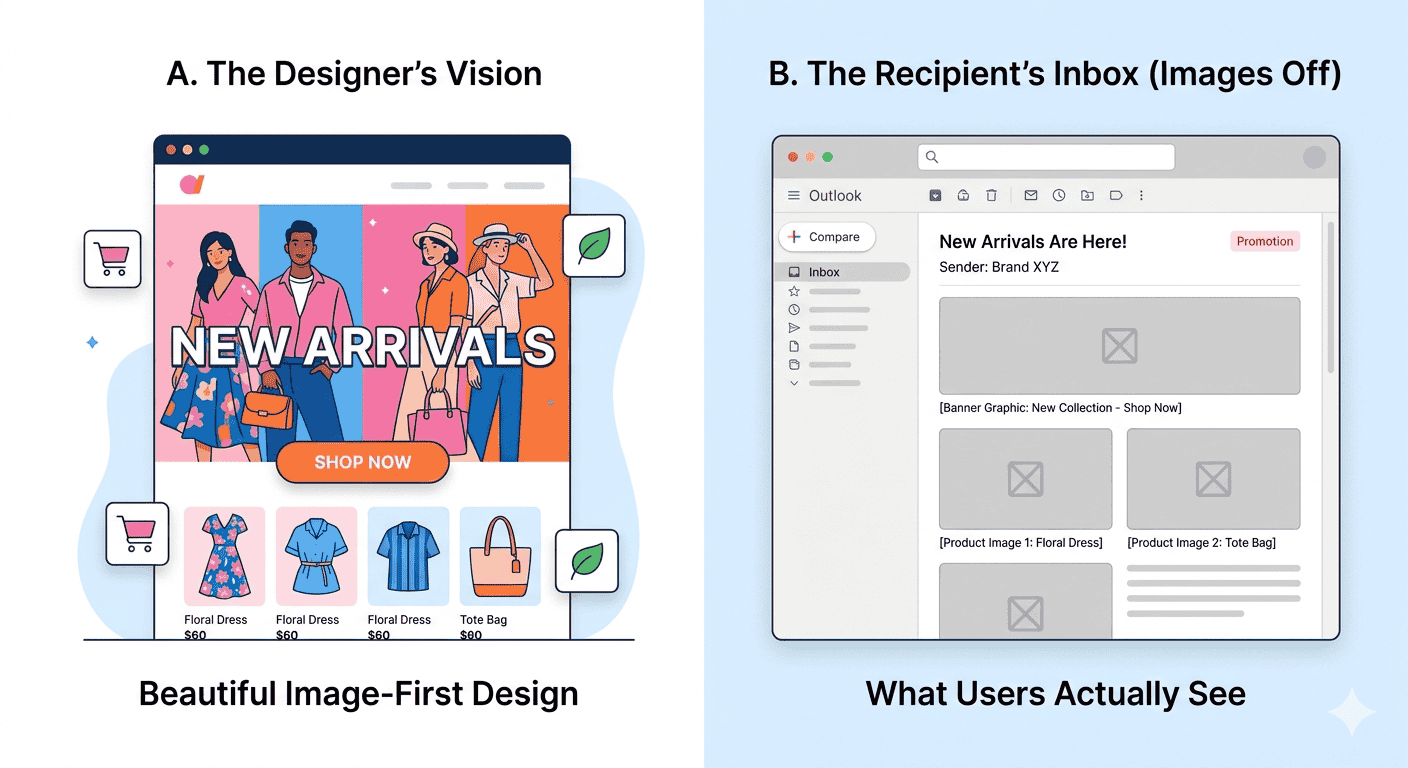
Outlook blocks images by default. Gmail blocks images from unknown senders. Corporate IT departments often strip images entirely for security reasons. And plenty of individual users have manually disabled image loading for data or privacy reasons.
When your entire email is one big image — or when all your key messaging is embedded in graphics — those users see nothing. Not a broken layout. Not a fallback message. Just empty boxes and placeholder icons where your carefully designed content used to be.
For a campaign targeting a business audience, this isn't a fringe scenario. It could affect 20–40% of your recipients depending on industry and platform mix.
3. Image-Only Emails Fail Accessibility Standards
Screen readers — used by blind and visually impaired users — cannot interpret text inside images. If your headline, your offer, your call to action, and your unsubscribe link are all embedded in a graphic, a screen reader user receives none of that information.
Beyond being a poor user experience, this creates real ADA compliance exposure, particularly for brands in healthcare, finance, education, and other regulated industries. Alt text helps, but it's a band-aid on a structural problem. Actual HTML text is the only real solution — see our guide to creating a mail using HTML for how to build emails this way from the ground up.
The irony is that many brands sending inaccessible emails are the exact brands loudly proclaiming their commitment to inclusivity in their marketing. The two don't add up.
"But My Image Emails Get Clicks!"
This is where the conversation gets nuanced — and where a lot of marketers get tripped up.
Yes, image-heavy emails can generate clicks. E-commerce brands selling fast-fashion or impulse-buy products often see solid click-through rates on visually rich emails, because the audience is browsing, not reading. The email functions more like a digital flyer than a communication.
But clicks and sales are not the same thing.
One practitioner with years of client experience put it plainly: text-based emails get sales. Image emails drive window-shopping behavior — people click, browse, and leave. Text-based emails, which feel more like a personal communication, build trust and drive purchase decisions.
This tracks with broader research on buyer psychology. People buy from people and brands they trust. A polished graphic feels like an ad. A well-written email that addresses a real problem feels like a conversation. One of those formats closes deals more reliably.
The Deliverability Math: What the Data Shows
Inbox placement rates tell the story clearly. Email marketing agencies that have tested image-heavy versus text-heavy campaigns on similar lists consistently report that text-forward emails achieve higher inbox rates — often 15–25 percentage points higher.
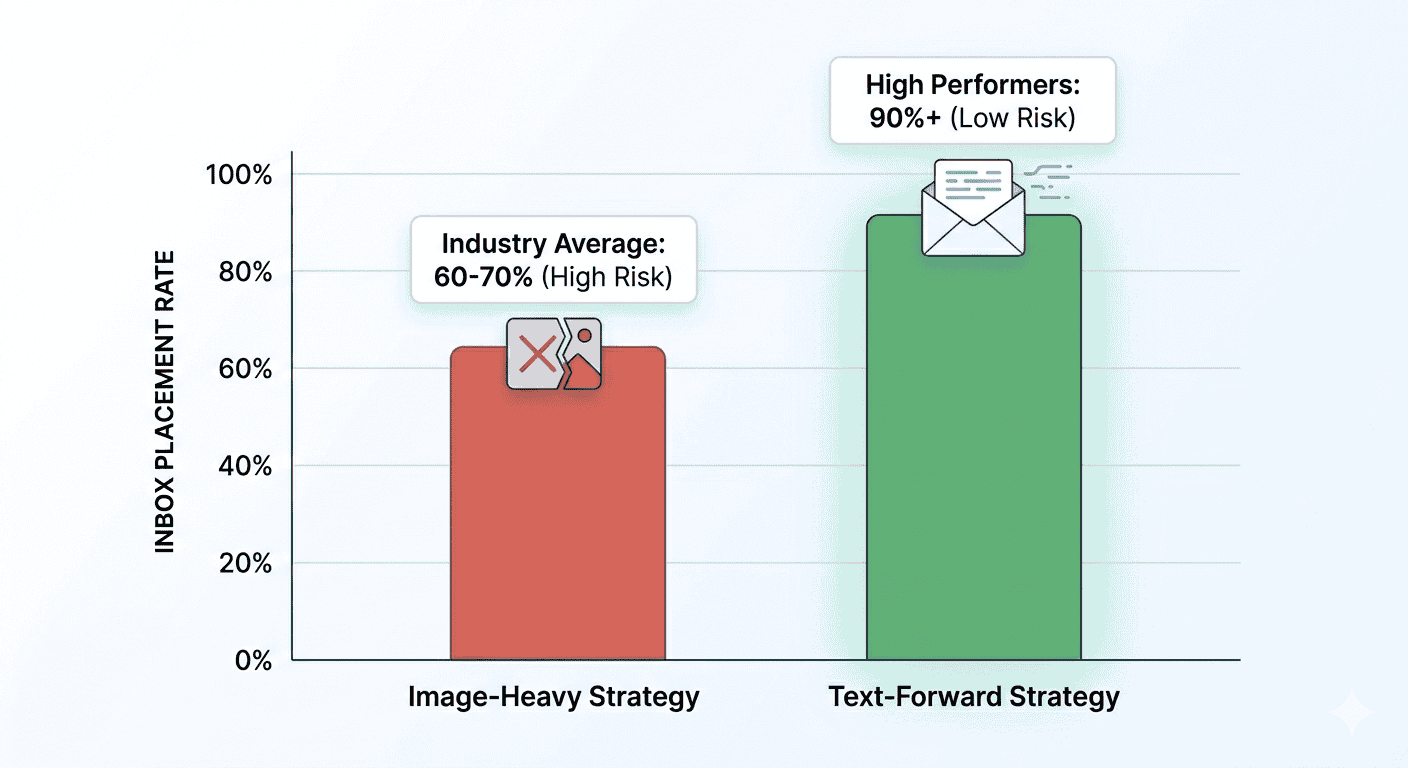
A 90%+ inbox placement rate is achievable with a text-forward approach. Many image-heavy senders are operating at 60–70% and attributing the difference to list quality, sending frequency, or bad luck — when the real culprit is staring them in the face every time they design a campaign.
The compounding effect matters too. Lower inbox placement leads to lower open rates. Lower open rates train inbox providers to trust your domain less. Which leads to even lower inbox placement. It's a spiral that gets harder to reverse the longer you stay on the image-heavy path.
What Email Providers Actually Reward
The signals that earn inbox trust are:
- Engagement: Opens, clicks, replies, and time spent reading
- Relevance signals: Text content that matches what subscribers opted in for
- Sender reputation: Consistent sending patterns from a healthy domain
- List hygiene: Low bounce rates and spam complaint rates
- Text-to-image ratio: A balance that looks like a legitimate human communication, not a spam campaign
Notice what's on that list: engagement, relevance, reputation. All three are better served by text-heavy emails that people actually read, reply to, and forward — than by image-heavy emails that get glanced at and closed.
The Industries Where This Matters Most
Finance and insurance: Risk-averse industries where ADA compliance and deliverability failures have real regulatory and reputational consequences. Text-forward is essentially non-negotiable.
Healthcare: HIPAA-adjacent communications have no business relying on images. Accessibility is a legal baseline, not a nice-to-have.
B2B and SaaS: Business buyers are reading emails in Outlook. Outlook blocks images. End of discussion. Our SaaS email marketing guide covers this audience in more depth.
Nonprofits and education: Audiences that respond to story and mission, not visual flash. Text does more.
The one genuine exception? Visually-driven retail. Fashion, furniture, food — industries where the product is the visual experience. Even here, though, the best-performing emails pair product imagery with strong HTML text, not image dumps.
The Smarter Framework: Text-First, Images as Support
The goal isn't to eliminate images. It's to stop relying on them to carry your entire message.
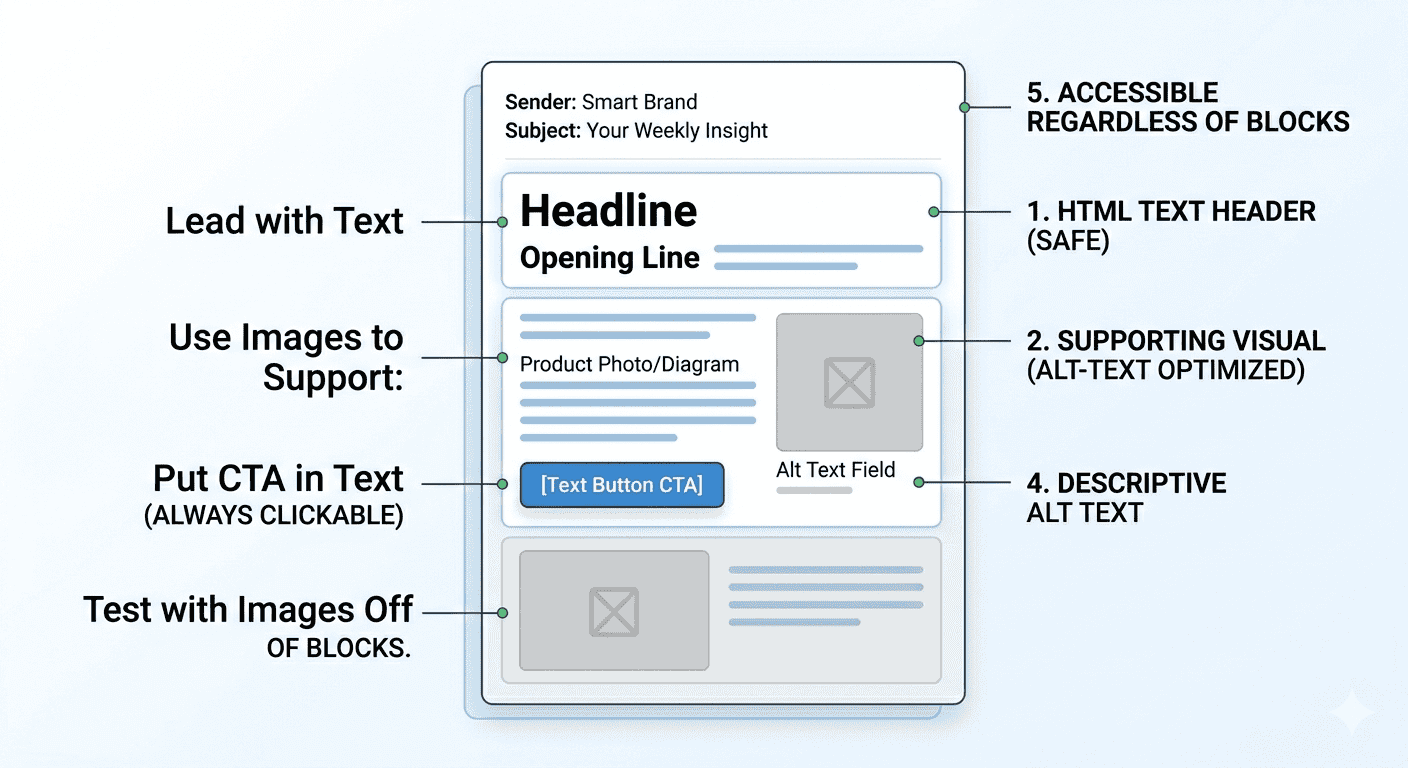
Here's the framework that consistently outperforms:
Lead with text. Your subject line hooks them. Your opening line does the real work of getting them to read. This has to be HTML text — not an image with words inside it.
Use images to support, not replace. Product photos, diagrams, and visual accents add value. A banner that contains all your messaging adds none.
Put your CTA in text, not a button embedded in an image. A real HTML button or linked text phrase is clickable even when images are blocked. An image-based CTA is invisible.
Write alt text that actually communicates. If an image doesn't load, your alt text should convey the same meaning. "Banner image" is not alt text.
Test with images off. Before sending, disable image loading in your email client and read your email. If it still makes sense and still prompts the desired action, you're in good shape. If it's a blank screen, you have a problem.
What Great Email Copy Actually Looks Like
The emails that land in the inbox, get opened, and generate sales tend to share a few characteristics:
- They're written like a person wrote them, not like a design agency assembled them
- They have a clear, single point to make
- They don't bury the lead under a giant hero image
- They treat the reader like someone with a problem worth solving, not a pair of eyes to dazzle
- They use white space and short paragraphs for scannability — not images to break up the monotony — and readable web-safe fonts that render everywhere
The best email marketers think like writers, not art directors. They know that a well-crafted sentence does more than a custom illustration. They know that trust is built word by word, email by email, over time.
The Segmentation Caveat
One real nuance worth acknowledging: established senders with high engagement rates and strong domain reputation have more room to experiment with image-heavy designs. If your list is warm, your opens are high, and inbox providers already trust you, a visually rich email might land just fine.
The problem is most brands aren't in that position. And even the ones that are would likely see better results — particularly downstream conversion results — from stronger copy.
Segmentation helps too. You can test image-heavy formats with your most engaged segments while protecting deliverability, then use the results to make data-driven decisions rather than following industry fashion.
The Bottom Line
Image-heavy emails are everywhere because they're easy to build and look impressive in previews. But "looks good in a screenshot" is not the same as "works in the inbox."
The brands quietly outperforming their competitors in email? They're writing more. They're designing less. They're sending emails that feel like messages from a human being — because that's what inbox providers reward, and that's what readers respond to.
Text-first isn't a throwback. It's the most sophisticated email strategy available to you right now. And it's sitting there, underused, while everyone else races to upload the biggest hero image they can find. For the fundamentals of building a healthy email program around this principle, see our complete guide to email marketing.
Related Reading
PagenflowApril 19, 2026 PagenflowApril 19, 2026
 PagenflowApril 19, 2026
 PagenflowApril 19, 2026
 PagenflowApril 19, 2026
 PagenflowApril 19, 2026
 PagenflowApril 19, 2026
 PagenflowApril 19, 2026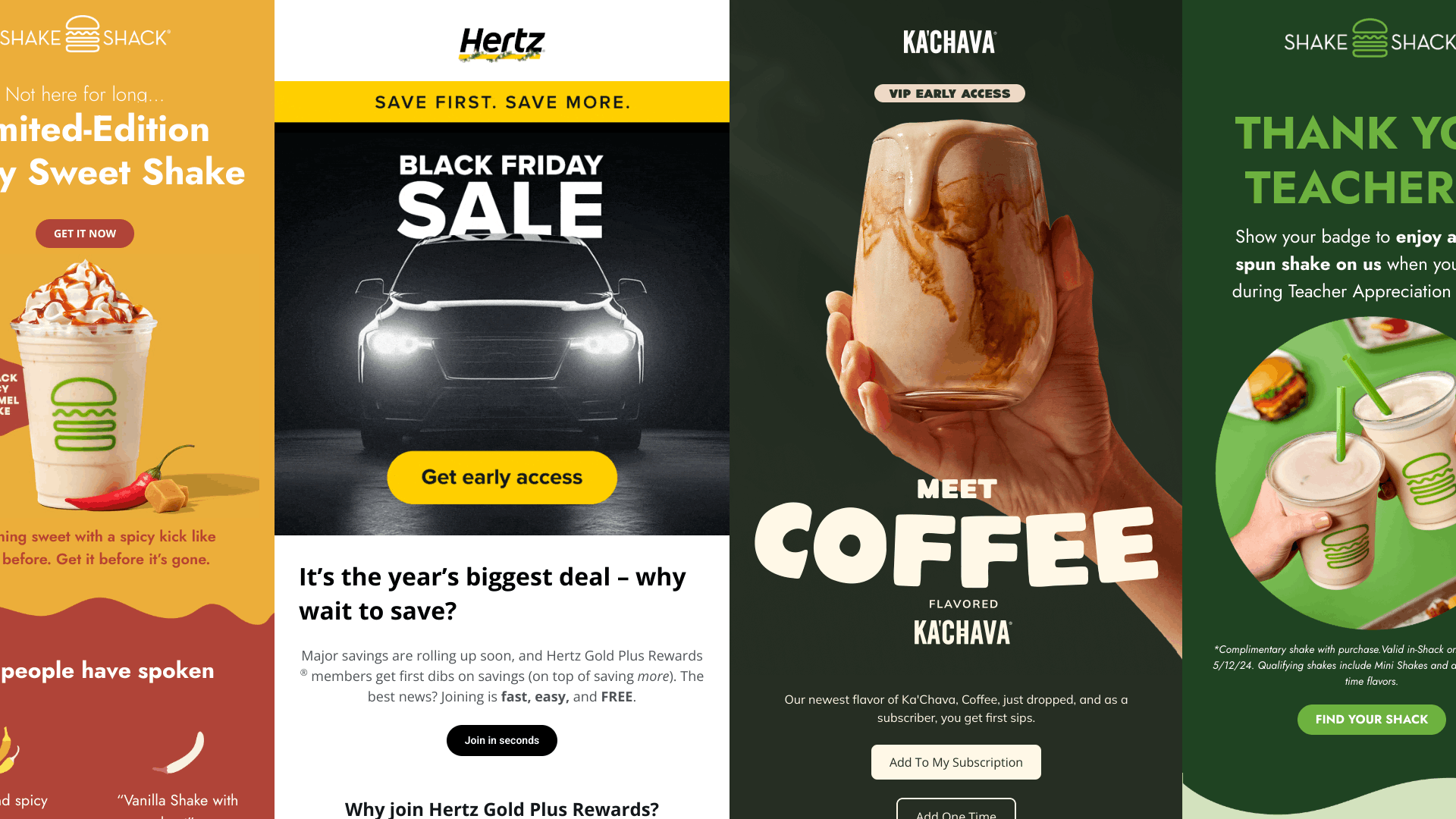
Ready to build your next email template?
Drag, drop, done. Build pixel-perfect, responsive emails in minutes — no HTML wrestling required.
No credit card required
Tested across Gmail, Outlook, Apple Mail & more.